SB-RKT4P-4TB slower read speeds in linux over time


  • @linuxssd Windows to Go with Rufus should work. We do not have a Linux-compatible update tool.


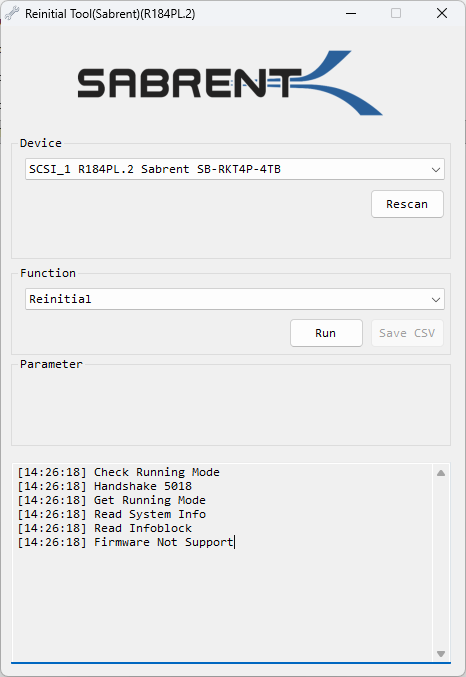
  • @The Sabrent Informer I have tried with the drive both in a m.2 slot and in an USB4 ASM2464PD enclosure that uses PCIe tunneling which should function just like a m.2 slot. I've done all sorts of firmware operations through the ASM2464PD with a ton of different NVMe drives and it's behaved just like a m.2 slot and I never had any problems with it. But anyways, I don't think having any sabrent drive connected matters when first unpacking the exe file, which is when I get the missing pcie_dll.dll error. When I got the error, I tried it on other systems to see if same thing would happen and it does. My main test system is an Intel NUC 11 Performance, but I also tried it on a various other NUCs (Raptor Lake) and laptops (Alder Lake and Lunar Lake) that I had after that. It just doesn't get past the first extraction stage. I'm sure the program might care about how the drive is connected once it actually runs, but I haven't really gotten to that point yet.

    The R184PL.x variant is still a Phison E18 controller with 2gb of DRAM cache correct? I will probably have to peel the paper sticker on the back of the drive to peek at the NAND chip markings in order to find out if it is BiCS (do you know if it would be 5, 6, or 8?), Micron B58R, or something else. Is there a later firmware than R184PL.2? I'm hoping maybe there is a firmware that helps with the disconnections with an enclosure. The disconnects only happen with extended heavy writes. I thought initially it was heat related, but the enclosure I'm using has an outstanding thermal solution and I verified by monitoring temps during the writes and the drive is staying very cool.


  • Oh BTW, with the utility, it does extract several other files correctly, it is only the pcie_dll.dll file that seems to be missing.

    Well I answered my own question about my drive ;).... I checked one of the memory chips on my 4TB R184PL.2 variant and it is a BiCS5 NAND. Overall, the physical package is similar to the 8TB variant that also used BiCS5. It has 8 NAND chips, 2 DRAM chips, and a controller on the board, which is double sided. Anyways, please let me know if there is a newer firmware for this one, I'll see if it helps with the enclosure disconnection. Thanks!


  • @McChen I ran this tool on an Alder Lake setup with i9-12900K and Z690 Formula, as well as on an AMD R9 7950X and ROG 670E Hero-based system with basic/clean installs and the drive in PCIe slot 1 on each. Something on your systems may be stopping the process from locking the needed file/files due to background apps/services. On my systems, the pcie_dll.dll does not get created in the folder where the tool runs, either. Regardless, we should be getting a new tool for you to try around the end of next week. Drives with BiCS flash do not need updating. It is only for certain batches of B47R models. 

    As for the USB4 adapter, that should work - as you mentioned, the PCIe tunneling aspect is usually supported. If the enclosure was not USB4, say a USB 3.2 adapter instead, no drive update would work at all. I have also performed a few drive updates on Intel-based TB adapters in the past, but just not this specific one, nor with an ASMedia-based enclosure. Hopefully, the next tool will sort things out for you. 

    Now addressing the disconnects underload comment - typically, that points to the enclosure/host port at fault, not the drive, especially when temperatures are within operating range. After working with multiple ASM2464PD enclosures, I have also noticed the same issue with stability under little to high loads, especially with the higher capacity drives. Sometimes the host port firmware needs updating, others are the enclosure's firmware, but sometimes the enclosure's PCB design is at fault or even the cable, too. Potentially, the bridge chip or PMIC on the enclosure is overheating when the drive goes offline, but I can't say for sure. Normally, firmware addresses it. Power management can be tricky. The drive just says it needs power, and if the enclosure can't provide, it will go offline, or the link will be reset. 


  • @McChen We have an updated ETA. It will take another week. 


  • Thanks for the update, I'll test it whenever it is ready. I'll see what config works, I have both ASM2464PD enclosures and JHL7440 ones to try, plus the internal m.2 slot. The test system I have is a clean installed Windows 11 25H2 with nothing else on there, so it should eliminate any background and random other stuff.

    The ASM2464PD can be a finicky beast....I've tested extensively with about 4 different enclosure designs, 15 different NVMe drives, and numerous firmware versions for both the enclosure, drive, and host. When it works, it works great, and the ASM2464PD firmware has improved significantly over the past couple years, but sometimes on certain drives I get disconnects that I can't debug further. A lot of instability I've solved through fixing cooling issues for both the drive and the bridge chip, managing power draw, better cables, or using the latest firmwares, but there have been certain drives that still don't play nice for whatever reason. The Intel Thunderbolt ones like the JHL7440 aren't immune from this problem either, though I think overall it happens less with those. One time I even had an internal m.2 slot have a persistent disconnection problem with only a specific model drive. But that drive worked in almost everything else with no problem. I suppose it's just one of those things with tech, a huge combination of different configs and versions


  • 1
  • 2 / 2
Please login to reply this topic!