If my drive is already on R184PL.2, I would not need to run this right? If the R184PL.2 firmware is the latest, then my drive is up to date and it should not be affected by the performance degradation issue anyways since that only affects the B47R ones?
This tool still gives the error about pcie_dll.dll when it is first run. Other than that first message, it does appear to still run. This is what I got when I did the "reinitial" operation, but I assume this might be because I'm already on R184PL.2.
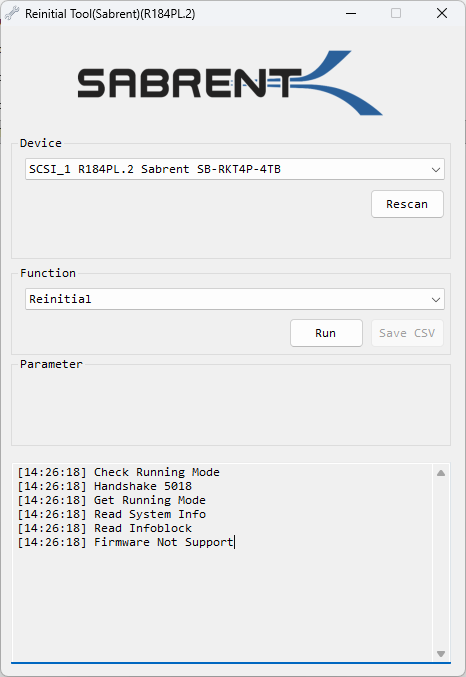
Is there an updated tool for the B47R version? I have one of those too that's on R4PB47.4.
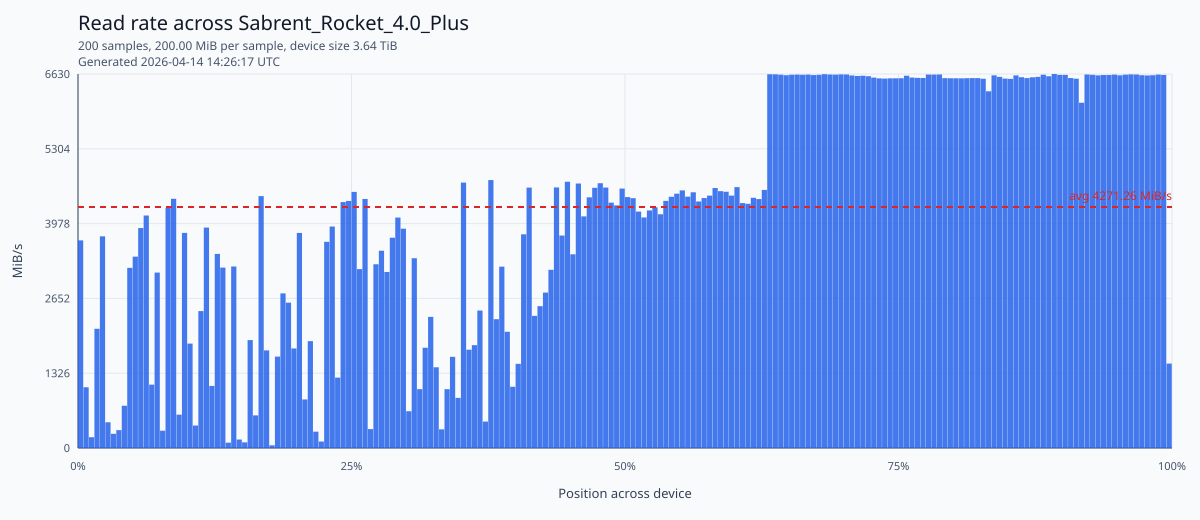
Chiming in here with a Sabrent Rocket 4 Plus 4TB drive that slows to a crawl and requires a full block discard every single year. Device is used a consumer Linux workstation for weekend projects and web browsing. Drive is in good health as reported by SMART data and behaves perfectly fine after a yearly block discard, but this is kind of ludicrus for such a permium drive and a low intensity use case.
Drive details:
- Model/SKU: Sabrent Rocket 4.0 Plus 4TB / SB-RKT4P-4TB
- Controller: Phison E18
- Firmware: R4PB47.4, updated from R4PB47.2 in 2025
- OS: Linux
- SMART: no media/data integrity errors seen during prior incidents
I used block-benchie to demonstrate that all the data sitting on the device since the last erase and rarely re-written like personal documents has slowed to a crawl when I hit them.
Past story here with a lot of details before it was discovered that the NVMe drive was purely to blame:
https://www.reddit.com/r/btrfs/comments/11008ad/repeated_nvme_phison_e18_btrfs_6000_mbs_200_mbs/
I contacted Sabrent last year and was given "R4PB47.4" which seems to be built on Phison's EIFM31.6 for the E18.
Is EIFM31.7 or later available? Other vendors have distributed this version for other E18 NVMe drives for over a year.